
How Rails Builds `params` Before Your Action Runs
`params` is not one thing. It is a dynamic combination of route, query, and request body parameters, making it a flexible and powerful tool for handling requests.

In the last article, we looked at how Rails turns a matched route into a controller action execution. One important idea appeared there briefly:
params is assembled before your action runs.
It’s easy to nod along with that statement and move on. We use params so often that it almost feels like magic: a single object that appears inside the controller, ready to use.
But params is not just one thing.
It is a mashup, pieced together from different parts of the request.
This is worth understanding because many controller bugs come down to the shape of the params. Maybe a value is missing, or a nested key is not where you thought it would be. Sometimes JSON does not get parsed. Sometimes an id shows up from an unexpected place. Other times, Strong Parameters quietly filters something out, making it seem like Rails never received it in the first place.
To debug these kinds of problems, it helps to have a clearer picture of where the params come from.
By the end of this article, you should be able to answer this question clearly:
How does Rails build the
paramsobject your controller action reads?
Let’s Get the Right Mental Picture
Here’s the big idea:
params is a merged request structure built from route, query, and request body params.
When your controller action runs, you get to reach for a single object:
paramsBut behind the scenes, Rails pieced that object together from several places:
Route params
Query params
Body params
  ->
controller params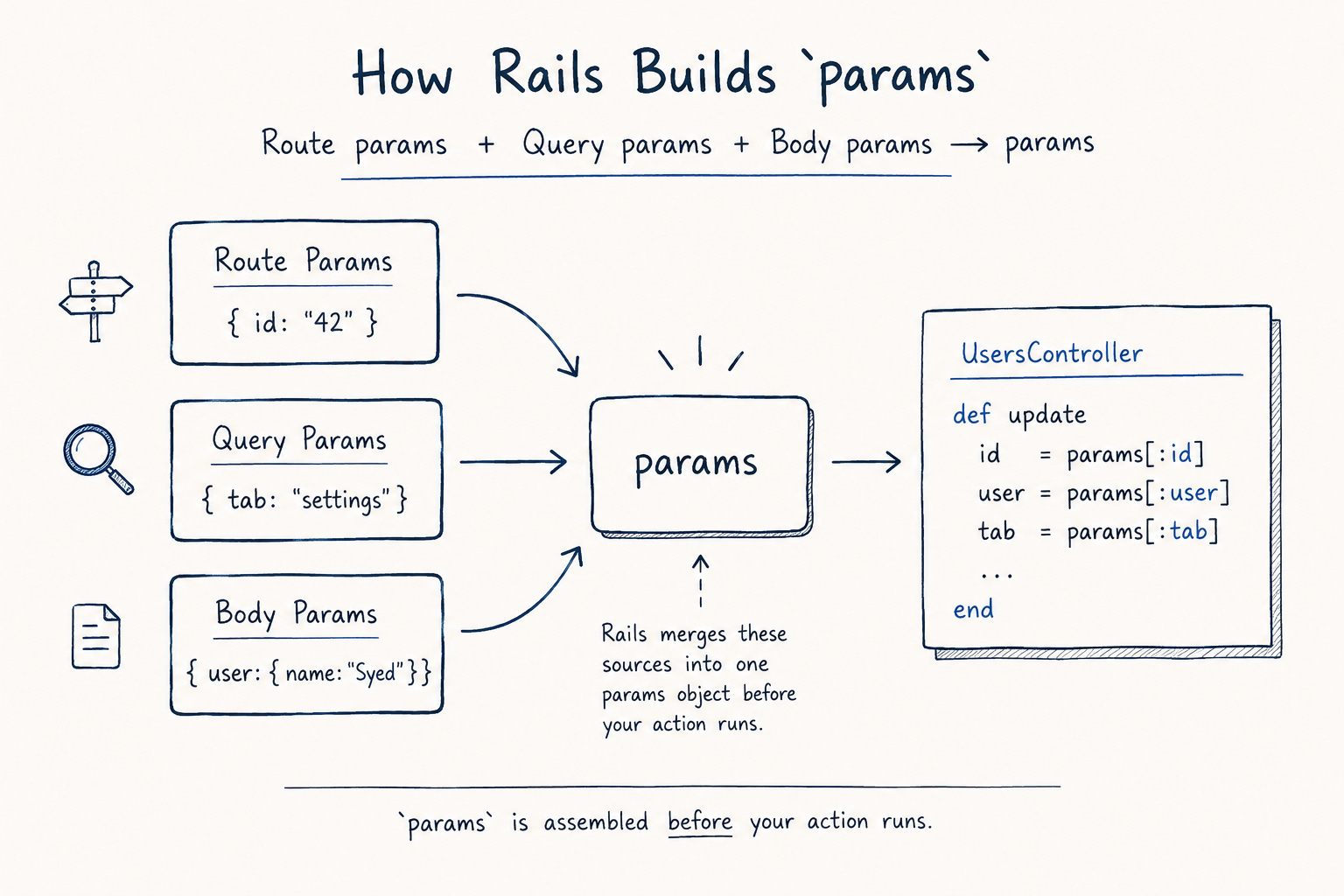
So when you write:
def show
  User.find(params[:id])
end
That line looks like ordinary Ruby.
But params[:id] is already the result of work Rails did earlier: matching the route, parsing the request, and preparing a controller-facing structure before the action began.
The Three Sources of params
For most controller actions, the useful way to read params is to separate them back into their sources.
Take this request:
PATCH /users/42?tab=settingswith a form body like:
user[name]=SyedBy the time this request reaches a controller action, Rails may expose all of those values through params. But each piece entered the request through a different door.
Route Params Come From the Matched Route
Route params are born in the router.
Suppose your routes include:
patch "/users/:id", to: "users#update"and the request is:
PATCH /users/42The router matches the path pattern and extracts the dynamic segment:
{ id: "42" }That value came from the path itself.
This is the same idea we saw in routing: dynamic segments become route params. The controller action doesn’t inspect the URL path and pull out ”42” manually. The router already did that work before the dispatch reached the action.
So when UsersController#update reads:
params[:id]It is usually reading a value that the router extracted from the path.
This shows up quickly when params[:id] is missing. The first question shouldn’t be “what did my action do wrong?” The first question should be:
Did the route that matched this request actually define an
:idsegment?
Query Params Come From the URL After ?
Query params come from the query string, the part of the URL after the question mark.
For a request like:
PATCH /users/42?tab=settingsRails can parse:
tab=settingsQuery params are common for filters, search terms, pagination, and view state:
GET /users?page=2&sort=nameThose values are not route params, nor body params. They are request data encoded in the URL itself. But once Rails assembles controller params, you usually access them the same way:
params[:page]
params[:sort]
That is convenient, but it can hide the source of a value. params[:tab] doesn’t tell you where tab came from. It only tells you that the tab is present in the merged structure.
Body Params Come From Submitted Request Data
Request body params come from data submitted in the request body. For a normal HTML form submission, the browser sends fields using names like:
user[name]=AslamFor a JSON API request, the client might send:
{
  "user": {
    "name": "Aslam"
  }
}
In controller code, though, Rails still presents them through params:
params[:user]That means a single request can contribute to params from multiple places at once.
For example:
PATCH /users/42?tab=settingswith:
user[name]=Aslamcan give the controller a merged params share like:
{
  "id" => "42",
  "tab" => "settings",
  "user" => {
    "name" => "Aslam"
  }
}
At the controller boundary, all of that data shows up through one object, but it didn’t enter the request as one thing.
How Rails Merges Them
Once Rails has these pieces, it has to combine them into one structure. The precedence looks like this:
body params < query params < route/path paramsIn other words, Rails starts with request body params, overlays query params, and then overlays route params.
The source-level shape is roughly:
request_parameters.merge(query_parameters).merge!(path_parameters)This is the key internal detail to remember:
request_parametersare body params.query_parametersare query string params.path_parametersare the route params.
Because later params win, route params take precedence when the same top-level key appears in multiple sources.
So if you have a route like:
patch "/users/:id", to: "users#update"and a request like:
PATCH /users/42/id=99The path still says:
id = "42"The query string also says:
id = "99"But in the final merged params, the route value wins:
params[:id] # 42This is useful in debugging. If a top-level param value seems to come from the “wrong” place, remember that params is merged. The final object doesn’t show you the source history. It only shows you the winning value.
A small note on the merge order: this order has been stable across Rails 5, 6, 7, and 8. Some older 5.x and 6.0 code paths had additional encoding handling around this step, but the precedence remained the same. You can see the current shape in ActionDispatch::Http::Parameters#parameters, and the same precedence appears in the older Rails 5.1 API docs.
How Nested Params Get Their Shape
One of the most common surprises with params is that it can contain nested hashes and arrays. That shape often starts with bracket notation.
For example, an HTML form might submit fields named:
user[name]=Aslam
user[email]=aslam@example.com
Rails parses those names into a nested structure:
{
  "user" => {
    "name" => "Aslam",
    "email" => "Aslam@example.com"
  }
}
So the controller code can say:
params[:user][:name]The nested hash is not something Rails guessed. It came from the way the submitted fields were named. The same idea applies to deeper nesting:
user[address][city]=Bangalorewhich becomes conceptually:
{
  "user" => {
    "address" => {
      "city" => "Bangalore"
    }
  }
}
Arrays use bracket notation too:
ids[]=1&ids[]=2There are plenty of deeper parser details here, especially around arrays of hashes and invalid shapes. But the main point is enough for most controller debugging:
Nested params usually come from nested parameter names.
If the submitted name is:
name=AslamThen you shouldn’t expect:
params[:user][:name]to exist.
The shape of params follows the shape of the submitted keys.
How JSON Body Params Join the Same Structure
JSON follows the same broad idea: data in the request body can be included in the params. The difference is the format Rails has to parse.
Suppose the client sends:
{
  "user": {
    "name": "Syed"
  }
}
with a content type like:
Content-Type: application/jsonRails can parse that JSON body and make it available through params:
params[:user][:name] # SyedFrom inside the controller, it can look almost the same as a form submission.
For form-encoded data, Rails is parsing bracket-style parameter names. For JSON, Rails is parsing a JSON document.
Either way, the result becomes request body params. Then those body paras are merged into the same final params object as the route and query params.
This is why the content type matters.
If a client sends something that looks like JSON but doesn’t identify it as JSON, Rails may not parse it the way you expect. API debugging often starts with boring-looking details:
What body did the client send?
What
Content-Typeheader did it send?Did Rails parse the body into
request.request_parameters?
There is one small Rails behavior worth keeping in mind here.
If the JSON body is not an object at the root, Rails wraps it under _json.
The default JSON parameter parser decodes the body and returns the decoded hash directly. But if the decoded value is not a hash, Rails returns:
{ _json: data }So a body like:
["a", "b"]is not merged as a top-level key. Rails needs a key to attach it to, so it becomes available under _json.
That is not usually the main path in standard Rails controllers, but it is useful when debugging API requests. The behavior is visible in the DEFAULT_PARSERS definition in the ActionDispatch::Http::Parameters API docs.
Strong Parameters Come Later
Strong Parameters are related to params, but they happen at a different step.
params is built first, and the Strong Parameters step decides later which parts are allowed for mass assignment.
For example:
def user_params
  params.require(:user).permit(:name)
end
This code doesn’t create the incoming user params. It filters the params structure that Rails already built.
Suppose the email parameter was expected and didn’t make it through. That doesn’t mean Rails failed to receive email. Rails might’ve received it, built it into prams, and then Strong Parameters filtered it out because :email was not permitted.
So when debugging, separate the two questions:
Did Rails receive and parse the param?
Did Strong Parameters permit it?
Those are different problems: one is about request parsing and merging; the other is about controller-level filtering.
Debugging When params Look Wrong
When params don’t look right, it’s easy to focus on the controller action. But often, the issue starts earlier in the request process.
Here are some helpful questions to ask:
Is the Missing Param Actually in the Route?
If params[:id] is missing, start with the route. A route like:
get "/users", to: "users#show"doesn’t define an :id segment.
So this request:
GET /users?id=42may still give you an id, but that value came from the query string, not the route.
With a route like this, the id comes from the path:
get "/users/:id", to: "users#show"When in doubt, inspect the route set:
bin/rails routesThe route pattern tells you which path parameter can exist.
Did a Collision Hide the Value You Expected?
If the same key appears in more than one source, the final params object only shows one value.
For example:
PATCH /users/42?id=99You might expect the query string value to take precedence because it appears at the end of the URL. But Rails merges route params last, so:
params[:id] # "42"If a value looks surprising, compare the sources instead of only looking at the merged result:
request.path_parameters
request.query_parameters
request.request_parameters
Those three methods show you the pieces before they become the final controller-facing params. Often, comparing those three sources is the fastest way to find where the confusion entered.
Did the Submitted Shape Match the Code?
Nested params depend on submitted key names. If your controller expects:
params[:user][:name]then the submitted form field needs a nested name like:
user[name]If the field was submitted just as name, then the shape is different: params[:name].
The issue isn’t with the params themselves; it’s a mismatch between the structure of the submitted data and what the controller expects.
This happens often in custom forms, API clients, JavaScript submissions, and tests that build params by hand.
Did Rails Parse the Body?
If the body params are missing, check whether Rails parsed the body at all. For JSON requests, the first place to look is the content type.
A client might send a body that looks like JSON:
{
  "user": {
    "name": "Syed"
  }
}
But if the request doesn’t identify it as JSON, Rails may not put it into params the way your controller expects. So this header matters:
Content-Type: application/jsonAgain, the useful debugging move is to separate the sources:
request.request_parametersIf the body params are missing, the issue is earlier than Strong Parameters and before the action logic.
Is This Really a Symbol or a String?
Inside controllers, params is usually forgiving about symbol and string access:
params[:user]
params["user"]
Both work in normal controller code.
Rails wraps params in ActionController::Parameters, which supports indifferent access for this kind of lookup. But the confusion can appear after you convert or pass data around:
params[:user].to_hOr, when a plain Ruby hash enters the picture in tests or service objects.
The practical rule is:
Controller params are forgiving. Plain hashes may not be.
So if symbol and string access behave differently, ask whether you are still working with ActionController::Parameters or whether the data has been converted into an ordinary hash.
The Point of All This
params is not a single object that simply appears inside your action. It is the result of parsing and merging request data.
The shape looks like this:
request body params
  +
query string params
  +
route/path params
  ->
params before your action runs
And the precedence is:
body params < query params < route/path paramsThat means:
body data supplies submitted form or JSON values
query data supplies values from the URL after
?route data supplies values extracted from the matched path
route params win when top-level keys collide
Strong Parameters filter the structure after it has already been built
That puts the controller action in its proper place.
It is not the place where the request data begins. Instead, it is reading a request structure that Rails has already assembled.
And once the action has read that request structure, Rails still has another job ahead: turning the action’s result into an HTTP response.